How positioning works
Blecon delivers real-time location across indoor and outdoor environments without the usual constraints of an RTLS deployment. Tracked tags broadcast standard Bluetooth signals and any nearby hotspot picks them up, whether that's a fixed installation on the ceiling, a hub mounted in a vehicle, or a mobile device carried by a frontline worker. The positioning engine calculates positions continuously across all of them.
The process
- Tags broadcast Bluetooth signals continuously.
- Hotspots detect those signals and measure the signal strength (RSSI).
- Hotspots report measurements to the Blecon cloud.
- The positioning engine selects the best available measurement to calculate the tag's position.
Detection and position
A position needs a detection, but not every detection gives a position. An asset's page shows the two times side by side:
- Last detected: when the network last received any data from the tag. A position, a sensor reading and a sighting by a hotspot all count.
- Last position: when the tag last got a confident position. Zones and alerts use this position.
A tag has no GPS of its own. Its position comes from the hotspots that detect it, so a detection gives a position only when the positioning engine can use it. A detection gives no new position when:
- The hotspot does not know its own location, or its location is too old to use. Set the hotspot's location, or check that the Blecon Agent has permission to use location.
- The position is less accurate than the workspace's accuracy filter. The asset stays at its last accurate position on the map, and Last position does not change. Last detected shows the new detection.
- The tag has not moved. The engine sends a new position for a still tag at the heartbeat of the positioning profile: every 5, 10 or 20 minutes. Between heartbeats, Last detected can be newer than Last position.
- Positioning is turned off for the network or the account, or the Agent's tracking policy does not allow its location at that time or place.
Select the Last Position time on the asset's page: the Analysis panel shows which cause applies.
How hotspots know their location
Hotspots determine their own position in one of three ways:
- Manual configuration: You set the hotspot's exact coordinates (GPS on the map, or local x/y/z through the Tracker API). Most accurate.
- GPS: Hotspots with GPS modules determine their own position. Typical accuracy: 5–10 metres.
- WiFi/cellular: Hotspots estimate their location from nearby networks. Typical accuracy: 10–100 metres.
The system automatically prefers hotspots with better location accuracy and excludes those with stale data.
Position calculation
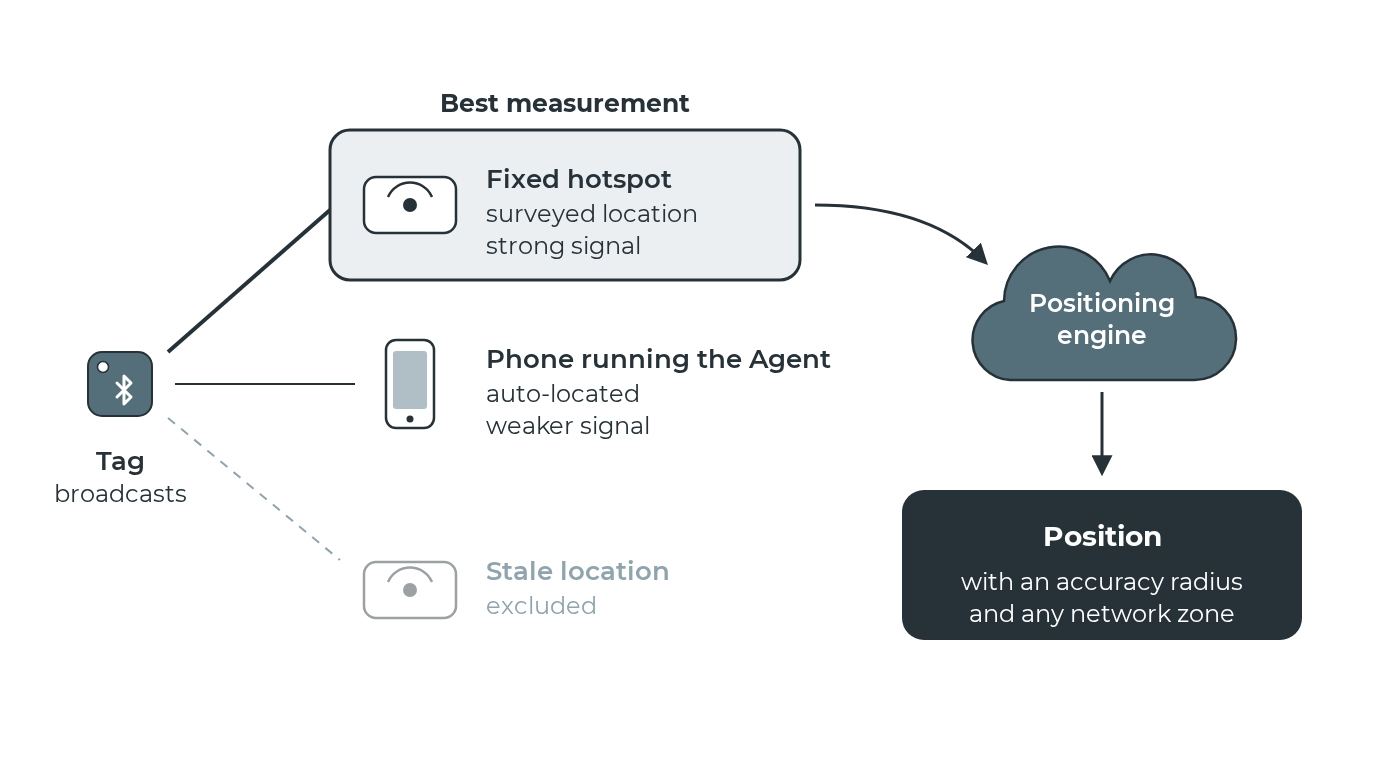
The positioning engine selects the best available measurement to calculate the tag's position, giving room-level or area-level accuracy.
When multiple hotspots detect the same tag, the system automatically picks the best hotspot based on signal strength and location accuracy.
Collection window
The system collects measurements over a configurable time window (150 seconds on the default Balanced profile) before calculating a position. The positioning engine processes accumulated measurements in regular cycles. Longer windows provide more data but increase latency.
When position events are emitted
Calculating a position and emitting a position event are separate steps. The engine calculates continuously, but only emits an event when something meaningful has changed. A new network.device_position event is sent when any of the following conditions are met:
| Condition | Details |
|---|---|
| First detection | The first time a tag is detected after it is registered. Always emits immediately. |
| Tag moved | The tag has moved beyond the movement threshold (default: 30 m) since the last position event, and a minimum interval has passed. |
| Heartbeat | A configurable interval (default: 10 minutes) has elapsed since the last position event, regardless of movement. Keeps the tag's last-known position current even when stationary. |
| Accuracy improved | The new position is at least twice as accurate as the last emitted one. This ensures that a tag detected initially through a low-accuracy hotspot (for example, a mobile device with stale GPS) gets a corrected position quickly once a better hotspot detects it, without waiting for the next heartbeat. |
If none of these conditions are met, the calculation runs but no event is emitted; the position has not changed meaningfully.
The trigger field on each position event indicates which condition was met. The movement threshold and heartbeat interval are set by the workspace's positioning profile (the defaults above are the Balanced profile's values), or individually when using the Custom profile.
Positioning indoors
Where GPS is poor or missing (indoors, underground, dense urban areas), place anchors on the map. When a hotspot detects a placed anchor, the hotspot gets a location fix at the anchor's position, if that fix is better than the location it already has. The tags that the hotspot detects are then positioned from it.
A hub placed on the map has a known position, so the tags it detects are positioned from that position. See Zones indoors for setup details.
Accuracy
Position accuracy depends on:
- Hotspot location accuracy: Manually surveyed coordinates produce better positions than WiFi/cellular auto-location.
- Hotspot density: More hotspots means finer-grained proximity detection.
- Environment: Walls, metal, and water absorb Bluetooth signals and affect which hotspot detects the tag.
| Configuration | Typical accuracy |
|---|---|
| GPS-positioned hotspots | Area level (5–10 metres) |
| WiFi/cellular auto-located hotspots | Broad area (10–100 metres) |
| Hotspots located by a placed anchor | Room/area level |
The accuracy value
Each position event includes an accuracy_meters value: an estimated accuracy radius in metres. This is not the raw GPS accuracy of the hotspot. It is a calculated value that accounts for two factors:
- Hotspot GPS accuracy: How precise the hotspot's own location fix is.
- Location freshness: How much time has passed since that fix, and how far the hotspot may have moved.
A mobile device standing still with a fresh GPS fix might produce a 5 m accuracy value. The same device after walking for 10 seconds without a new fix might show 15 m, because the device could have moved since its last known position. The accuracy value widens to reflect that real-world uncertainty.
In short: it's not that GPS is less accurate; it's that the system is being honest about the fact that a GPS reading from a few seconds ago doesn't perfectly represent where the hotspot is right now. A stationary hotspot will show accuracy much closer to its raw GPS.
You can filter out low-accuracy positions using the accuracy filter.
Two timestamps
Each position event includes two timestamps:
- Sample time: When the signal measurements were taken.
- Calculated at: When Blecon calculated the position from those measurements.
These may differ by seconds (real-time) or longer (if the tag was offline and uploaded measurements later).