Zone detection
Know exactly which room or area a tag is in, without precise coordinates. Zone detection gives you room-level presence tracking by assigning network zones to hotspots, perfect for indoor environments where GPS isn't available and you care more about "which room" than exact coordinates.
How it works
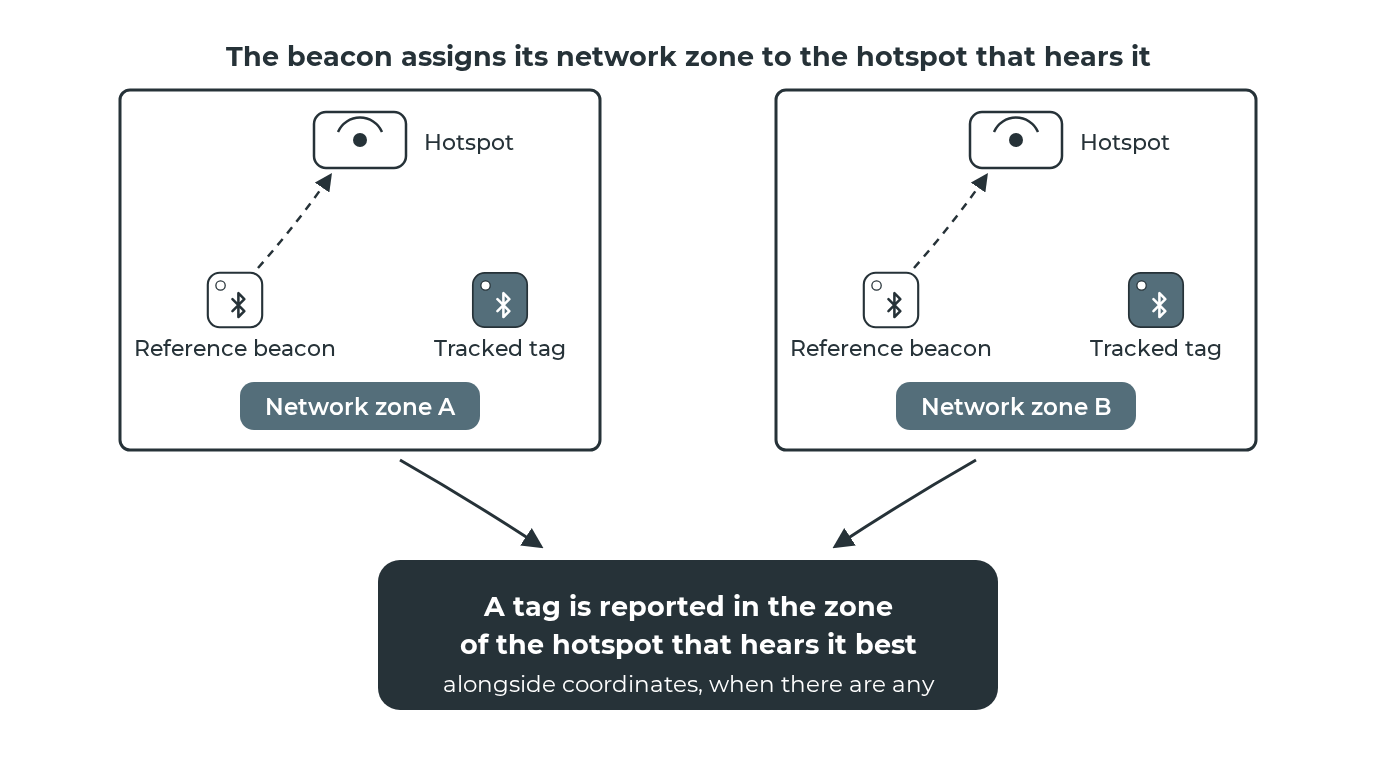
You place an anchor with a network zone assignment in the area. When a tag is detected, the system reports which network zone the tag is in based on the strongest hotspot signal.
Network zone information is included in position events alongside coordinates (when available). You get both; it's not either/or.
Setting up network zones
Create network zones in Zones → Network Zones, then assign a zone to an area using anchors:
- Register a tag and mark it as an anchor.
- Assign a network zone to the tag.
- Place the tag near the hotspot.
- The hotspot automatically inherits the tag's network zone assignment.
Anchors let you reassign network zones by moving tags without reconfiguring hotspots. See anchors for details.
Network zones vs coordinate zones
Zone detection creates network zones: proximity-based zones determined by which hotspot detects the tag. These are different from coordinate zones, which are geographic boundaries drawn on the map in Blecon Track.
Both zone types appear in the zones list and work with alert rules. Network zones are created in Zones → Network Zones and assigned to anchors; coordinate zones are drawn on the map in Blecon Track.
Network zone timeout
When a tag leaves a network zone, there's a configurable delay before the exit is reported (default: 70 seconds). This prevents false transitions from signal fluctuations.
Related pages
- Anchors
- Zones (Blecon Track)
- How positioning works
- Positioning settings