Rules Engine
Rules continuously monitor your assets and take action when conditions are met. Some rules raise alerts: a vehicle hasn't returned, equipment has left a restricted area, or a zone is over capacity. Others record events, linking tags that travel together or auto-associating items based on proximity. Define the conditions once, and Blecon Track watches 24/7.
How rules work
You define a rule with a type, parameters, and a severity. The system continuously evaluates tag positions against your rules. When a rule's condition is met, what happens depends on its severity:
- Notification (the default): the rule sends a notification — an informational, fire-and-forget event with nothing to resolve.
- Alert (
low,medium,high, orcritical): the rule raises an alert that stays active until the condition resolves and someone acts on it.
One rule type doesn't notify or alert: proximity association instead creates records linking tags together.
Deliver either kind to your team in real time by email or webhook — see event delivery.
To make a similar rule, click Duplicate on a rule's row on the Rules page. The dialog opens with the rule's settings filled in and the name set to "Copy of" the original. Change what differs and click Add Rule. The original rule does not change.
Common properties
Every rule has these properties:
| Property | Description |
|---|---|
| Rule name | A human-readable name for the rule |
| Rule type | The type of condition to monitor (see below) |
| Severity | notification (notify-only, the default), or low, medium, high, critical to raise an alert |
| Apply to | All tags, or a specific list of tag IDs |
| Enabled | Whether the rule is actively being evaluated |
| Routing keywords | Optional. Which delivery channels receive this rule's alerts — see Event delivery |
Rule types
Every rule starts from the same picker: go to Rules, click + Add Rule, and choose what you want to monitor. Selecting a type takes you to step 2, where you set its parameters, severity, and which tags it applies to.
You don't have to start from the picker. The AI rule builder can suggest rules from your workspace's own data (✨ Suggest rules, on the Rules page), or draft one from a sentence you type (Describe it instead, at the top of the Add Rule dialog). Either way you review the draft in this same editor before anything is created.
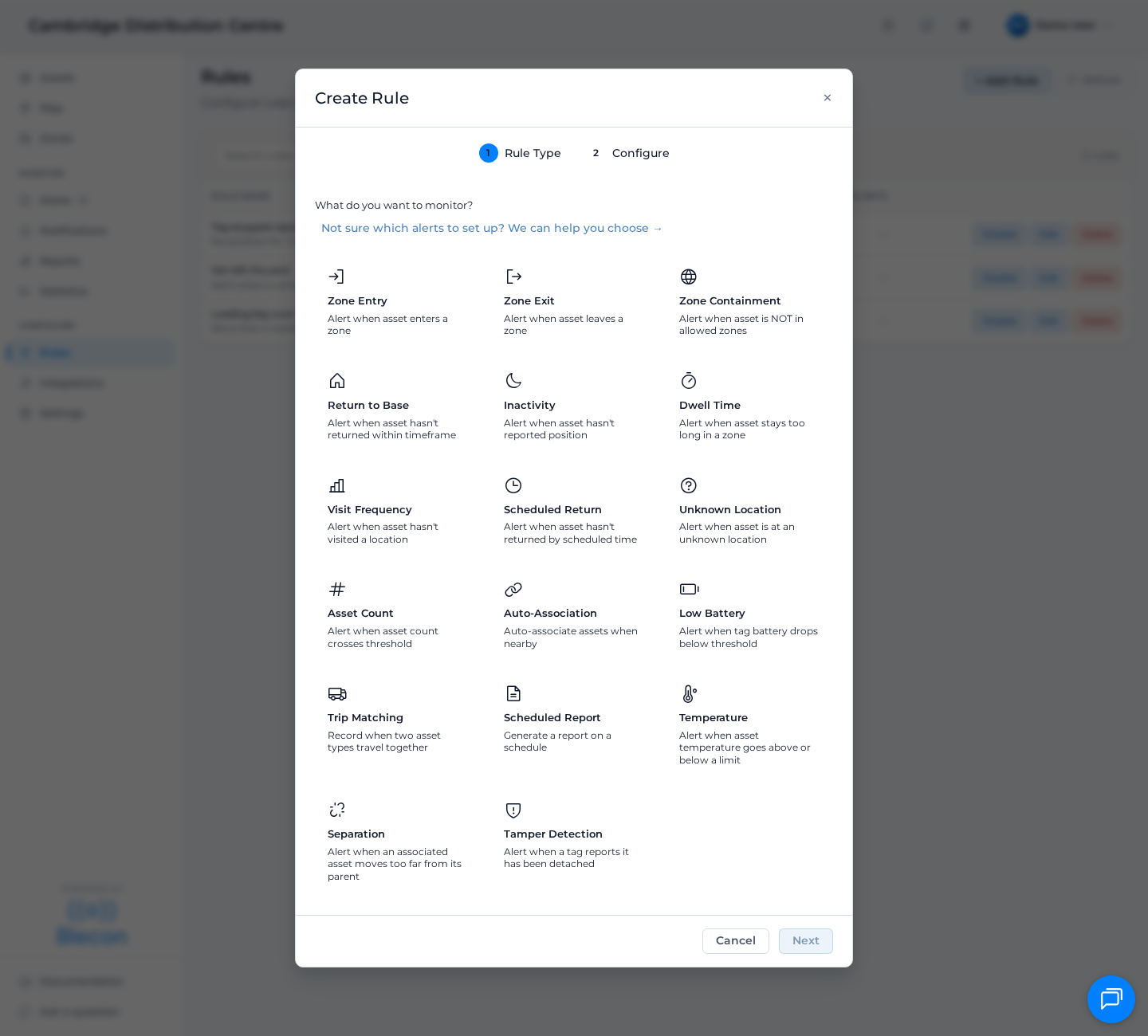
| Rule type | What it does |
|---|---|
| Geofence entry and exit | Alert when a tag enters or leaves a zone |
| Geofence containment | Alert when a tag is outside all allowed locations during specified hours |
| Not where expected | Alert when a tag has not returned to a zone, or has not visited it recently |
| Inactivity | Alert when a tag hasn't reported a position for too long |
| Dwell time | Alert when a tag stays in a location longer than expected |
| Unknown location | Alert when a tag is at an unregistered location |
| Zone asset count | Alert when asset count in a zone crosses a threshold |
| Proximity association | Auto-associate tags based on proximity |
| Separation | Alert when an associated asset moves too far from its parent |
| Trip completed | Notify when an asset finishes a trip, with distance, duration and both ends |
| Trip abandoned | Alert when an asset stops reporting in the middle of a trip |
| Trip overdue | Alert when a trip is still running longer than expected |
| Wrong destination | Alert when a trip ends somewhere other than the places you listed |
| Unscheduled stop | Alert when an asset waits a long time in the middle of a trip |
| Out of hours trip | Alert when an asset departs or arrives outside working hours |
Location types
Rules work with both zone types:
- Network zones: Proximity-based zones defined by hotspot or anchor assignments. A tag is "in" the zone when detected by a hotspot assigned to that zone. Best for indoor environments.
- Coordinate zones: Geographic boundaries drawn on the map (polygons or bounding boxes). A tag is "in" the zone when its GPS coordinates fall within the boundary. Best for outdoor environments.
Both zone types use the same location_id parameter in rules. The system handles the different zone types automatically.
Zone tags
Many rules accept zone_tags as an alternative to listing specific zone IDs. Tag your zones (e.g., parking, storage) and reference the tags in rules. The system resolves the tags to matching zones automatically. See Use zone tags to manage rules at scale.