Juniper Mist
The Juniper Mist integration lets you use existing Juniper Mist access points as Blecon device scanners — no additional hotspot hardware required.
How it works
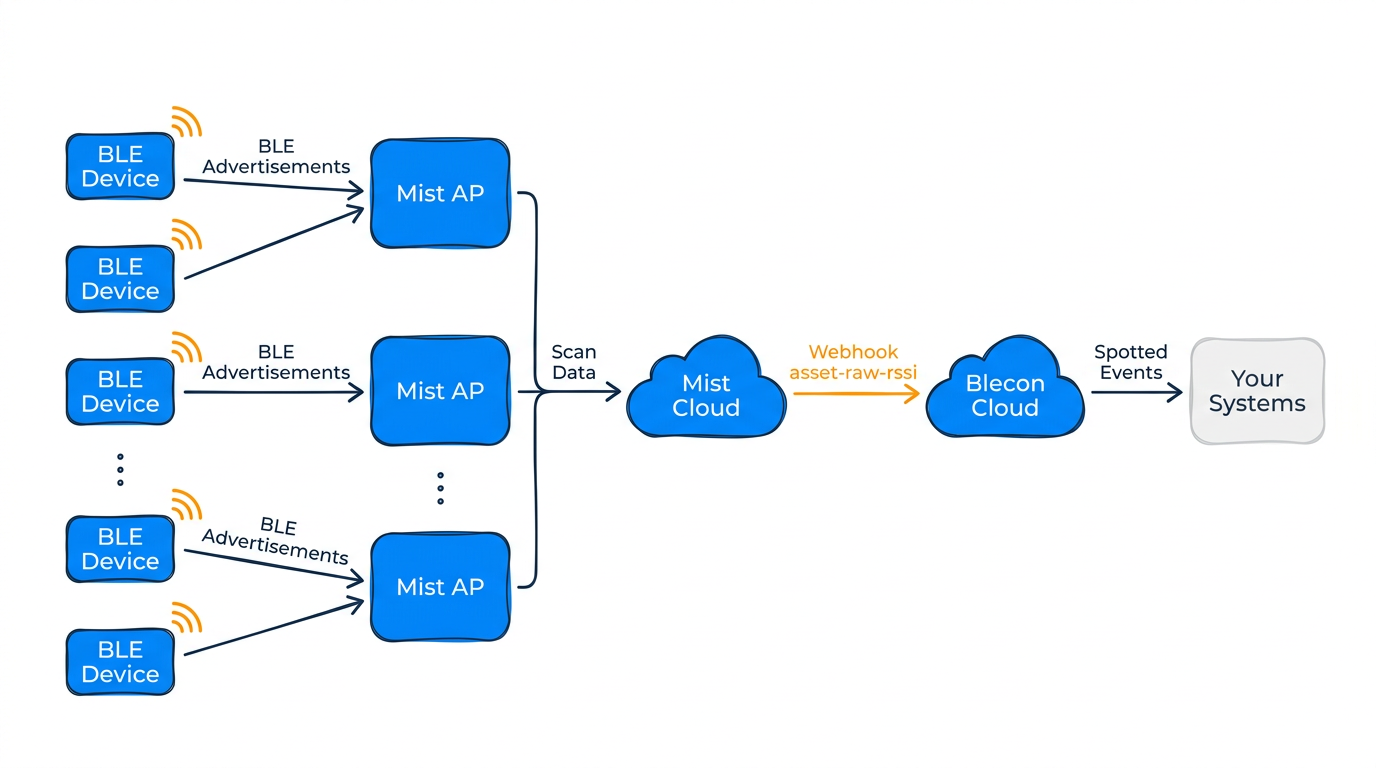
Mist access points passively scan Bluetooth advertisements. The integration receives this scan data from the Mist cloud via webhooks, extracts Blecon device identifiers from the raw BLE data, and creates spotted events that flow through the standard Blecon event pipeline.
Your devices must already be registered in Blecon. The integration only processes scans for known devices — unknown device IDs are silently dropped.
Setting up the integration
In Blecon
- In the Console, go to your account Settings > Integrations.
- Click Enable next to Juniper Mist.
- Enter your Mist API token and select your Mist region (US or EU).
- Click Save. Blecon automatically configures webhooks on your Mist sites and fetches AP positions.
In Mist (if setting up manually)
- Create an asset filter in the Mist portal with service UUID
FD0D. - Create a site-level webhook:
- URL: The Blecon ingest URL from your integration settings.
- Topic:
asset-raw-rssi - Secret: The shared secret from your Blecon integration settings.
If you have multiple Mist sites, create one webhook per site pointing to the same Blecon URL.
AP positioning
When you set up the integration with a Mist API token, Blecon automatically fetches AP positions from your Mist floorplans and converts them to GPS coordinates. This enables indoor positioning using your Mist infrastructure.
Use the Sync button in the integration settings to refresh AP positions after changes to your Mist floorplans.
Requirements
- Mist APs with BLE scanning enabled
- Devices registered in Blecon with supported ID formats
- Enterprise tier account