Accuracy filter
Keep your map clean and your alerts reliable. The accuracy filter automatically drops low-quality position updates before they reach the map, trails, or alert rules — preventing false zone transitions, noisy trails, and spurious alerts caused by poor GPS or cellular fixes.
Why set an accuracy filter
Not all position updates are equally useful. When hotspots rely on WiFi or cellular to estimate their own location, the accuracy of the resulting device positions can be poor — sometimes 50 meters or worse. If your alert rules use tight geofences or your map view covers a small area, low-accuracy positions can cause:
- False zone transitions — A device appears to leave and re-enter a zone because its reported position jumps around.
- Noisy trails — The map trail shows large zigzags instead of smooth movement.
- Spurious alert triggers — Geofence, dwell time, or return-to-base rules fire on bad data.
The accuracy filter prevents this by silently discarding position events that exceed your threshold.
How it works
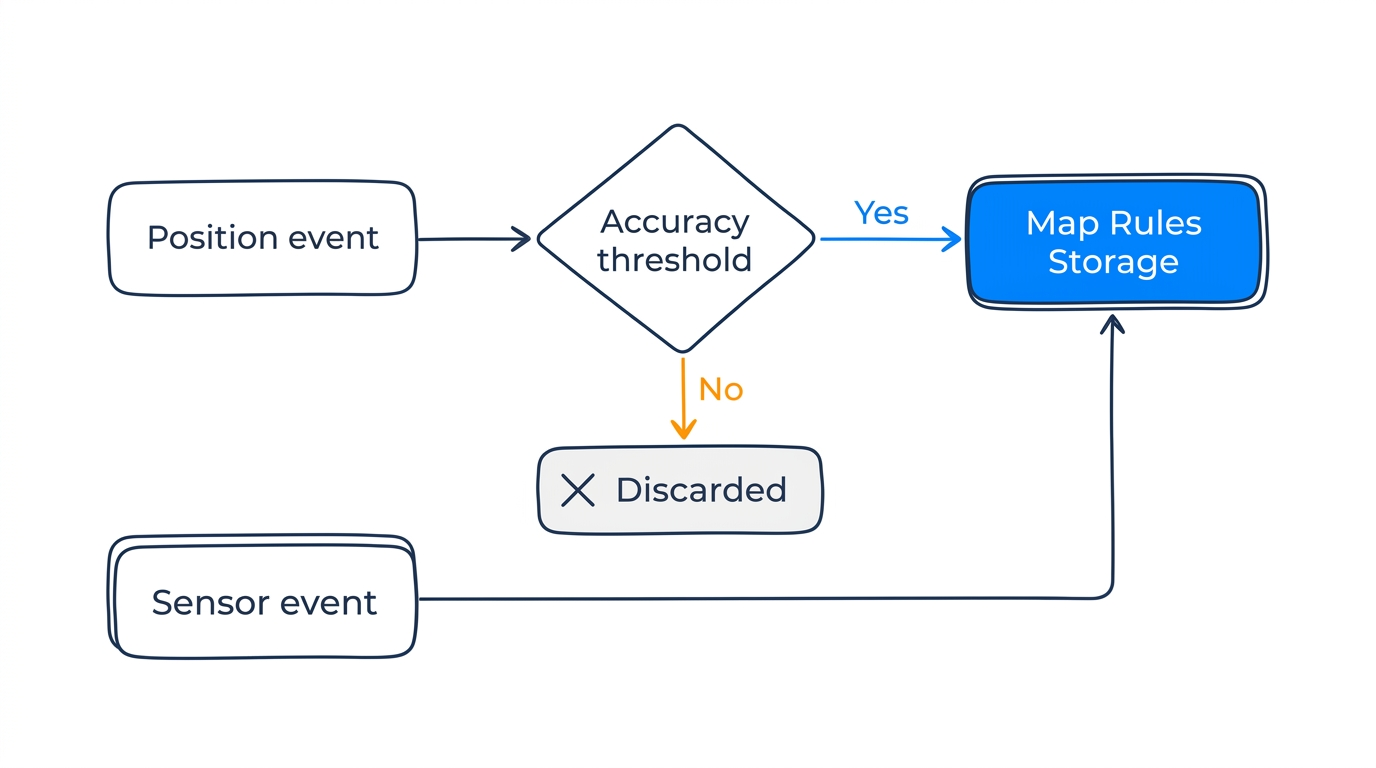
Each position event includes an accuracy_meters value — an estimated accuracy radius that accounts for both the hotspot's GPS accuracy and how fresh that fix is (see The accuracy value for details). The accuracy filter compares this value against your threshold:
- Accuracy <= threshold — The event is processed normally (stored, mapped, evaluated by alert rules).
- Accuracy > threshold — The event is discarded. It is not stored, displayed on the map, or evaluated by alert rules.
- No accuracy value — The event passes through (no filtering applied).
Sensor events (temperature, humidity, battery) are never filtered, regardless of the accuracy setting.
Default
The default threshold is 101 meters. This allows most real-world positions through while dropping very poor-quality fixes.
Configuring the threshold
In Blecon Track, go to Settings and set the Minimum Accuracy Threshold field to your desired value in meters.
- Set it lower (e.g., 20–50 m) if you need tight geofences and can tolerate dropping more updates.
- Set it higher (e.g., 200+ m) if you'd rather see all data and accept some noise.
- Set it to 0 to accept all position events regardless of accuracy.
When to adjust
| Scenario | Recommended threshold |
|---|---|
| Indoor deployment with surveyed hotspots | 20–30 m |
| Mixed indoor/outdoor with GPS hotspots | 50–100 m (default range) |
| Outdoor only with mobile hotspots | 100–200 m |
| Want all data, accept noise | 0 (disabled) |