Violations
Never lose track of an open issue. Violations give you a live, always-current view of every condition in your operation that needs attention — and they stay visible until the problem is resolved, so nothing slips through the cracks.
How violations work
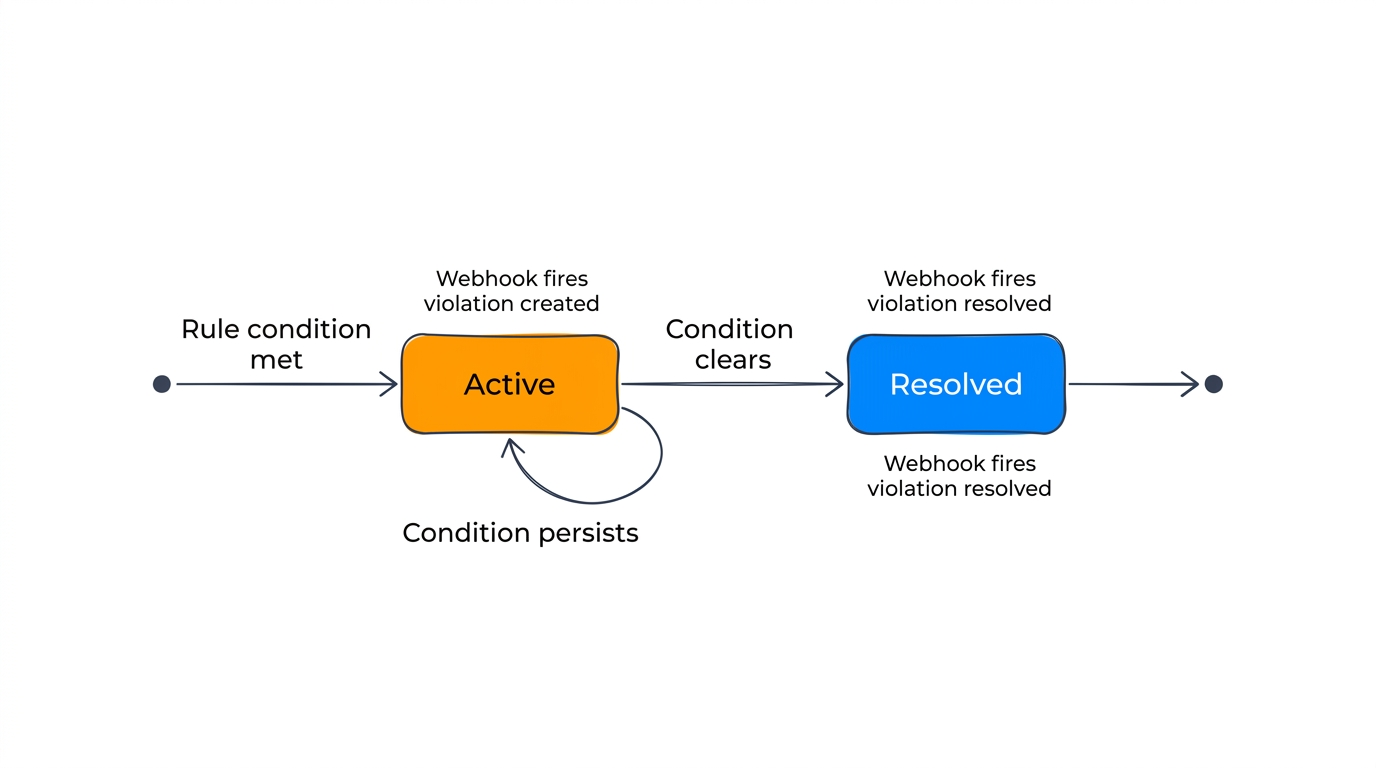
When an alert rule triggers, it creates a violation. Unlike one-time notifications, violations persist until the underlying condition resolves. This gives you a live view of everything that's out of compliance across your workspace.
For example: - A geofence exit violation stays active until the device returns to the zone. - A dwell time violation stays active until the device leaves the location. - An inactivity violation stays active until the device reports a new position.
The violations view
The violations list shows all active violations with:
- Rule name — Which alert rule triggered the violation.
- Device or location — The affected device (or location, for zone asset count rules).
- Severity — The severity level set on the rule.
- Triggered at — When the violation was first created.
- Duration — How long the violation has been active.
Resolved violations
When the condition that caused a violation no longer applies, the violation resolves automatically. Resolved violations move to the history view where you can review past incidents.
Notifications
Violations trigger webhook notifications when they're created and when they're resolved. Configure webhook channels on your alert rules to push notifications to Slack, incident management tools, or your own systems.